
Hyundai Accent (HC): Body Electrical System / Ignition Switch Assembly
Contents:
Repair procedures
1.Disconnect the ignition switch connector (B) and key warning switch connector (A) from under the steering column.
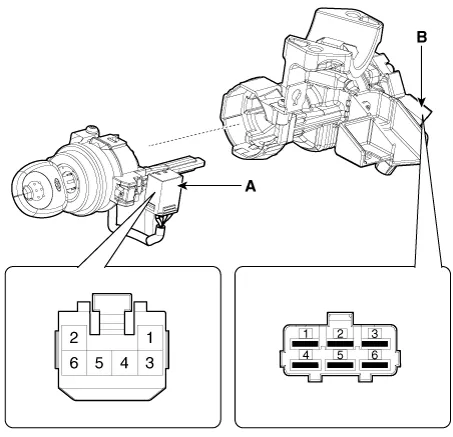
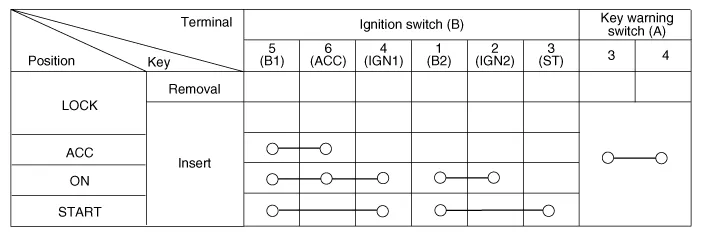
2.Check for continuity between the terminals.
3.If continuity is not specified, replace the switch.
1.Disconnect the negative (-) battery terminal.
2.Remove the crash pad lower panel.(Refer to Body - "Crash Pad Lower Panel")
3.Remove the steering column upper and lower shrouds.(Refer to Body - "Steering Column Shroud Panel")
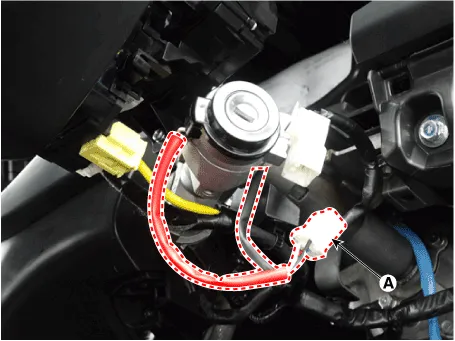
4.Disconnect the key warning/immobilizer connector (A).
5.Insert key and turn it to ACC position.
6.Pushing lock pin (A) with the awl.
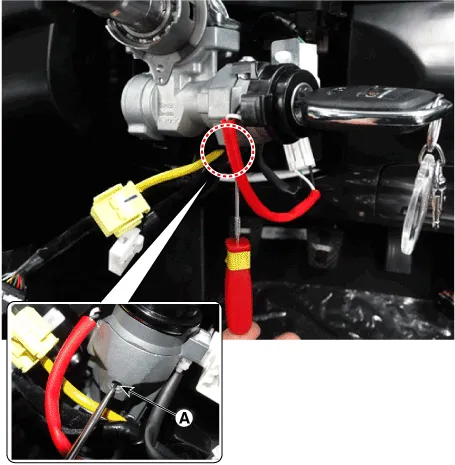
7.Remove the immobilizer coil antenna (A) after loosening the mounting screw.
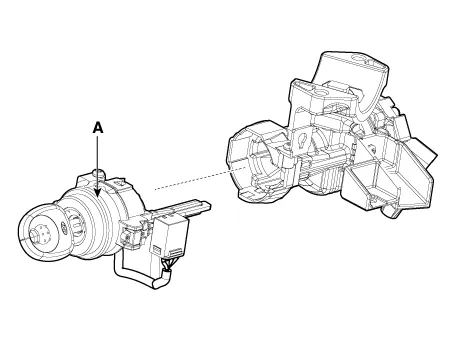
1.Install the key lock cylinder.
2.Install the key warning and immobilizer connector.
3.Install the ignition switch.
4.Install the steering column shrouds and crash pad lower panel.


Other information:
Hyundai Accent (HC) (2017 - 2022) Service Manual: Description and Operation
- Description Burglar Alarm State [B/A State] B/A StateDescription DISARM1) In "DISARM" state, no vehicle start inhibition. So, when door, hood, or Tailgate is opened, there is no alarm sound and flashing. 2) If the battery is disconnected while the state is not "ARM/ARMWAIT/ALARM/REARM", B/A state is set to "DISARM" state. 3)In "DISARM" state, security indicator keeps blinking.
Contents
Categories
- Manuals Home
- Hyundai Accent Owners Manual
- Hyundai Accent Service Manual
- Questions & Answers
- Video Guides
- Useful Resources
- New on site
- Most important about car
- Privacy Policy

0.0087