
Hyundai Accent (HC): Body Electrical System / Electro Chromic Inside Rear View Mirror
Contents:
Components and Components Location
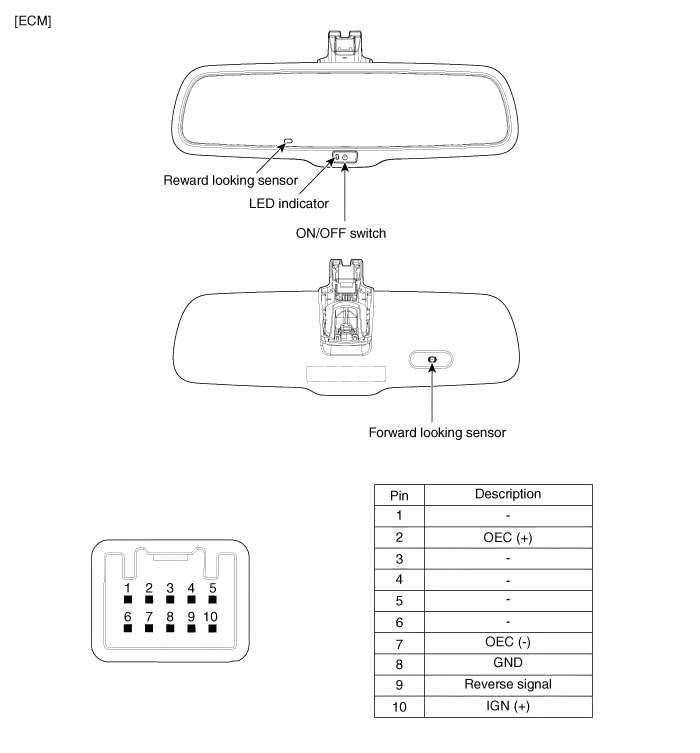
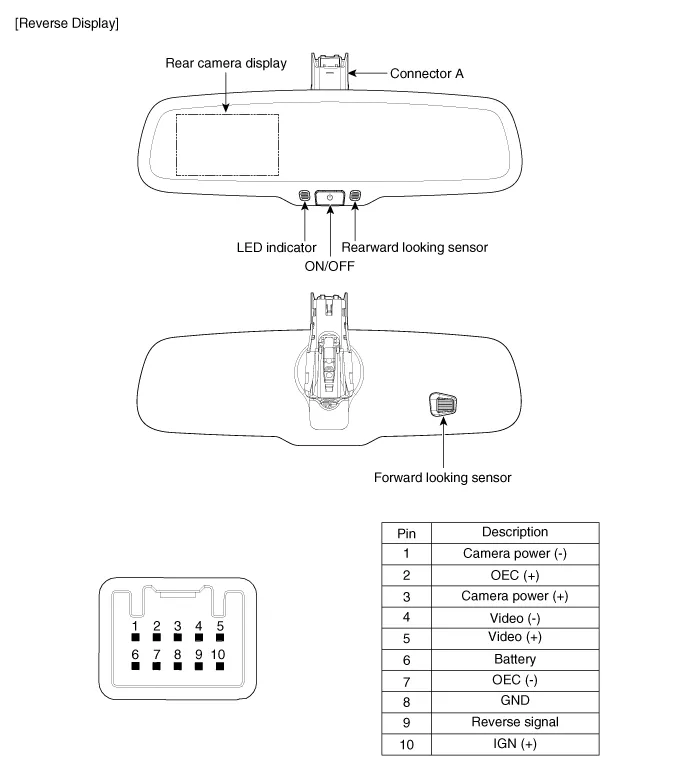
Description and Operation
1.The forward facing sensor sees if the brightness of the surroundings is low enough for the mirror to operate its function.
2.The rearward looking sensor detects glaring of the reflecting light from a vehicle behind.
3.The ECM is darkened to the level as determined by the rearward looking sensor. When the glaring is no longer detected, the mirror stops functioning.1. LED indicator2. ON/OFF Switch3. Rearward looking sensor4. Forward looking sensor
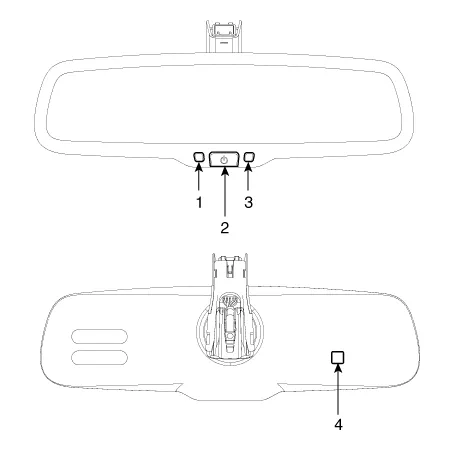
1.Pressing and holding the Feature Control button for more than 3 but less than 6 seconds turns the auto-dimming function OFF which is indicated by the green Status Indicator LED turning off.
2.Pressing and holding the Feature Control button again for more than 3 but less than 6 seconds turns the auto-dimming function ON which is indicated by the green Status Indicator LED turning on.

Repair procedures
1.Turn the ignition key to the "ON" position.
2.Cover the front sensor to stop functioning.
3.Shine a light at the rear sensor.
4.The ECM should be darkened as soon as the rear sensor detects the light.

5.When the reverse gear is engaged, the ECM should not be darkened.
6.When heading lights to both the front and rear sensors, the ECM should not be darkened.
1.Disconnect the negative (-) battery terminal.
2.Remove the mirror wiring cover (A) and disconnect the connector (B).
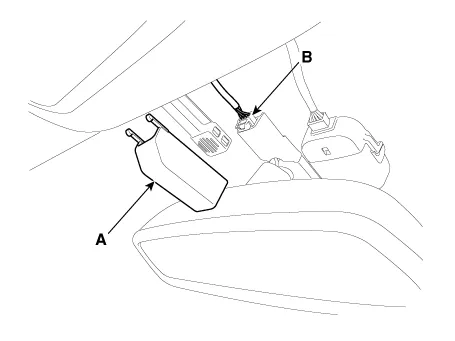
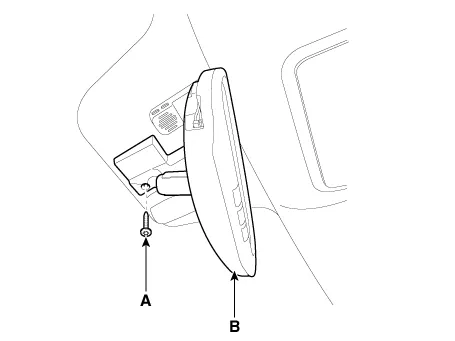
3.Remove the mounting screw (A).
4.Slide the inside rear view mirror rearward to remove the inside rear view mirror assembly (B).

1.Install the mirror assembly.
2.Install the mirror wiring cover and connector.

– Make sure the connector is plugged in properly.


Other information:
Hyundai Accent (HC) (2017 - 2022) Service Manual: Emission control system
The emission control system on your Hyundai Accent is covered by a written limited warranty. Review the warranty details in the Owner’s Handbook & Warranty Information booklet supplied with the vehicle. Your Hyundai Accent is equipped with an emission control system designed to meet applicable emissions regulations. The system is made up of three main parts, as follows.Hyundai Accent (HC) (2017 - 2022) Service Manual: Crankshaft
- Disassembly • Use fender covers to avoid damaging painted surfaces. • To avoid damage, unplug the wiring connectors carefully while holding the connector portion. • Mark all wiring connector and hoses to avoid misconnection. • To release the fuel system pressure before removing the engine assembly, start the engine without fuel pump relay.
Contents
Categories
- Manuals Home
- Hyundai Accent Owners Manual
- Hyundai Accent Service Manual
- Questions & Answers
- Video Guides
- Useful Resources
- New on site
- Most important about car
- Privacy Policy

0.011