
Hyundai Accent (HC): Infotainment System / Infotainment System
Contents:
- AUX, USB and iPod® Port
- Antenna
- Steering Wheel Audio Control
- Bluetooth® Wireless Technology Hands-Free
- How Vehicle Audio Works
- Features of Your Vehicle
NOTICE
- If you install an aftermarket HID head lamp, your vehicle's audio and electronic devices may not function properly.
- Prevent chemicals such as perfume, cosmetic oil, sun cream, hand cleaner, and air freshener from contacting interior parts because they may cause damage or discoloration.
AUX, USB and iPod® Port
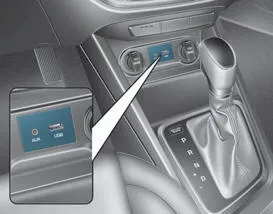
You can connect compatible audio devices to the Hyundai Accent using an AUX cable or a USB cable at the vehicle AUX or USB port. For best results, use quality cables and avoid sharply bending the connectors, especially when routing wires around the center console.
Information
When using a portable audio device connected to the power outlet, noise may occur during playback. If this happens, power the portable audio device from its own battery or dedicated power source.
Antenna
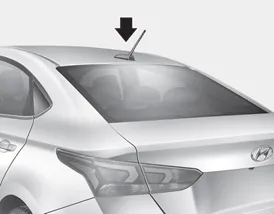
The roof antenna receives AM/FM signals to support radio reception in your Hyundai Accent. Keeping the antenna properly installed helps maintain consistent signal quality.
NOTICE
- Remove the antenna by rotating it counter-clockwise before entering a place with low ceiling height. Otherwise, the antenna may be damaged.
- Securely install the antenna in the upright position to guarantee proper signal reception. However, you may fold or remove the antenna before parking the vehicle or loading luggage on the roof rack.
- Do not load luggage near the antenna. This helps guarantee proper signal reception.
Steering Wheel Audio Control
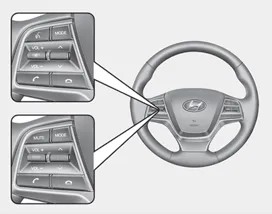
â– Type A
NOTICE
Do not operate multiple audio remote control buttons simultaneously.
VOLUME (VOL + / - ) (1)
- Press the VOLUME switch up to increase volume.
- Press the VOLUME switch down to decrease volume.
SEEK/PRESET (Ë„/Ë…) (2)
If the SEEK/PRESET switch is pressed up or down and held for 0.8 second or more, it will function in the following modes:
RADIO mode
It will function as the AUTO SEEK select button. It will SEEK until you release the button.
MEDIA mode
It will function as the FF/RW button.
If the SEEK/PRESET switch is pressed up or down, it will function in the following modes:
RADIO mode
It will function as the PRESET STATION UP/DOWN button.
MEDIA mode
It will function as the TRACK UP/DOWN button.
MODE (3)
Press the MODE button to toggle through Radio, SXM, or AUX modes. Depending on equipment, your Hyundai Accent may also allow switching between additional media sources.
MUTE (
 ) (4)
) (4)
- Press the MUTE button to mute the sound.
- Press the MUTE button again to activate the sound.
Information
Detailed information for audio control buttons is described in the separately supplied manual that comes with the vehicle. Use these steering wheel controls to keep your hands on the wheel and your attention on the road.
Bluetooth® Wireless Technology Hands-Free
In the Hyundai Accent, Bluetooth® Wireless Technology lets you connect a compatible mobile phone and place or receive calls without holding the device, helping you stay focused on the road while keeping conversations clear.
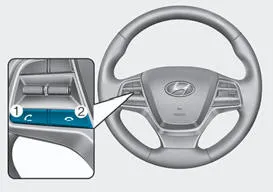

With Bluetooth® Wireless Technology in your Hyundai Accent, you can use your phone wirelessly for hands-free calling (and, if supported by your infotainment system, additional features such as audio streaming). Availability may vary by equipment and phone compatibility.
(1) Call / Answer button
(2) Call end button
(3) Microphone
For step-by-step pairing, voice command use, and troubleshooting in the Hyundai Accent, refer to the Infotainment User's Manual provided with your vehicle. As a quick tip, keeping your phone’s Bluetooth set to “visible� during initial setup can make pairing faster.
How Vehicle Audio Works
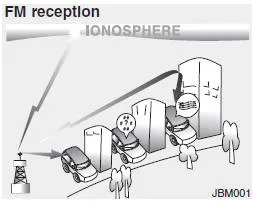
AM and FM radio signals are broadcast from transmitter towers located around your area. The roof antenna on your Hyundai Accent intercepts these signals, which are then processed by the head unit and delivered through the vehicle speakers.
When a strong radio signal reaches your Hyundai Accent, the audio system’s tuning and amplification are designed to provide crisp, balanced sound. However, in some situations the signal arriving at your vehicle may be weaker or less stable, and the listening experience can change.
Reception quality can vary based on distance from the station, the presence of other strong stations nearby, and obstacles such as buildings, bridges, terrain, or other large structures that partially block or reflect radio waves.
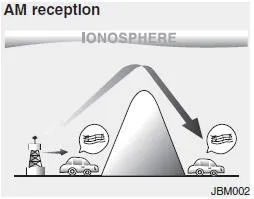
AM broadcasts can often be received at greater distances than FM broadcasts because AM radio waves are transmitted at lower frequencies. These long-distance, low-frequency waves can follow the curvature of the earth rather than traveling strictly in straight lines, and they may also bend around some obstructions, improving coverage.
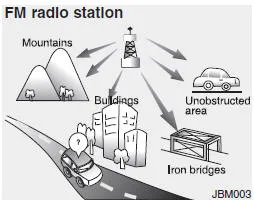
FM broadcasts are transmitted at higher frequencies and generally do not bend to follow the earth’s surface. As a result, FM reception typically begins to fade at shorter distances from the station. FM signals can also be more affected by buildings, mountains, and other obstructions, which may create intermittent or unpleasant listening conditions. These conditions are normal and do not indicate a malfunction in the Hyundai Accent radio system:
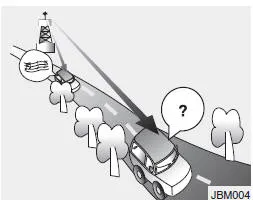
- Fading - As your Hyundai Accent moves away from a station, the signal can weaken and the audio may fade. When this happens, selecting a stronger station usually restores better sound.
- Flutter/Static - Weak FM signals or large obstructions between the transmitter and your vehicle can disturb the signal, causing static or fluttering noise. Lowering the treble setting may reduce the harshness until the disturbance clears.
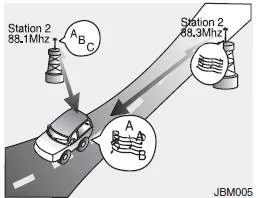
- Station Swapping - As an FM signal weakens, another stronger signal near the same frequency may briefly play. Your radio is designed to lock onto the clearest signal available. If this occurs, manually select a station with a stronger signal.
- Multi-Path Cancellation - Signals arriving from multiple directions can cause distortion or fluttering. This can happen when your Hyundai Accent receives both a direct signal and a reflected signal from the same station, or when two stations with close frequencies overlap. Selecting another station usually resolves the issue.
Features of Your Vehicle
Satellite radio reception
Depending on equipment, you may experience occasional difficulty receiving XMâ„¢ satellite radio signals in your Hyundai Accent in the following situations.
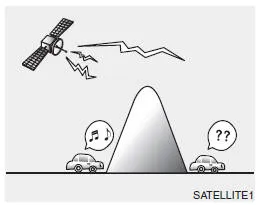
- If you are driving in a tunnel or a covered parking area.
- If you are driving beneath the top level of a multi-level freeway.
- If you are driving under a bridge.
- If you are driving next to a tall vehicle (such as a truck or a bus) that blocks the signal.
- If you are driving in a valley where surrounding hills or peaks block the signal from the satellite.
- If you are driving on a mountain road where the signal is blocked by mountains.
- If you are driving in an area with tall trees that block the signal (30 ft. / 10 m or more), such as a road through a dense forest.
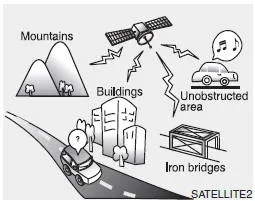
- The signal can become weak in some areas that are not covered by the XMâ„¢ repeater network.
Information
There may also be additional unforeseen circumstances that lead to reception problems with the XMâ„¢ satellite radio signal. Advisory messages, such as 'CH Unavailable', may appear when starting XMâ„¢ Radio.
iPod®
iPod® is a registered trademark of Apple Inc.
Bluetooth® Wireless Technology
The Bluetooth® word mark and logos are registered trademarks owned by Bluetooth SIG, Inc., and any use of such marks by HYUNDAI is under license. Other trademarks and trade names are those of their respective owners.
A Bluetooth® Wireless Technology-enabled cell phone is required to use Bluetooth® Wireless Technology. Bluetooth® Wireless Technology phone compatibility can be checked by visiting https://www.hyundaiusa.com/bluetooth.


Other information:
Hyundai Accent (HC) (2017 - 2022) Owner's Manual: Installing a Child Restraint System (CRS)
WARNING Before installing your child restraint system always: Read and follow the instructions provided by the manufacturer of the child restraint. Read and follow the instructions regarding child restraint systems in this manual. Failure to follow all warnings and instructions could increase the risk of the SERIOUS INJURY or DEATH if an accident occurs.Hyundai Accent (HC) (2017 - 2022) Owner's Manual: Specifications
- Specifications DescriptionSpecificationsLimit General TypeIn-line, DOHC   Number of cylinders4   Bore75.60 mm (2.9764 in)   Stroke89.0 mm (3.5039 in.)  Total displacement1,598 cc (97.52 cu.in)  Compression ratio11.2 ± 0.2 : 1  Firing order1-3-4-2   Valve timing Intake valveOpensBTDC 42° - ATDC 38°   ClosesABDC 7° - ABDC 87°   Exhaust valveOpensBBDC 43° - ABDC 2°   ClosesATDC 0° - ATDC 45°   Cylinder head Flatness of gasket surfaceLess than 0.
Contents
- AUX, USB and iPod® Port
- Antenna
- Steering Wheel Audio Control
- Bluetooth® Wireless Technology Hands-Free
- How Vehicle Audio Works
- Features of Your Vehicle
Categories
- Manuals Home
- Hyundai Accent Owners Manual
- Hyundai Accent Service Manual
- Questions & Answers
- Video Guides
- Useful Resources
- New on site
- Most important about car
- Privacy Policy

0.0091