
Hyundai Accent (HC): Infotainment System / Audio (With Touch Screen)
Contents:
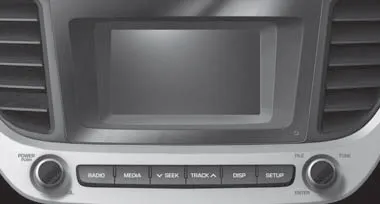
â– Type A
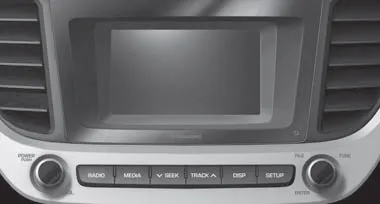
â– Type B
Feature of Your Audio
Head unit
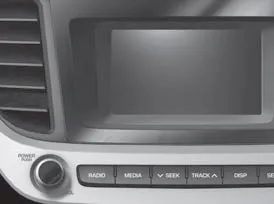
â– Type A
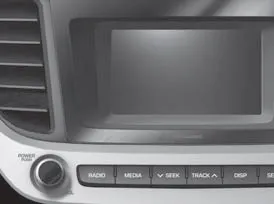
â– Type B
� The actual image in the Hyundai Accent may differ from the illustration.
(1) POWER/VOL knob
- Turn to adjust the volume.
- Press to turn the device on or off.
(2) RADIO
- Start FM, AM and SiriusXM* Radio.
* if equipped
(3) MEDIA
- Select USB (iPod®) or AUX or My Music.
- Display the media menu when two or more media are connected or when the [MEDIA] button is pressed in media mode.
(4) SEEK/TRACK
- Search for the next station in radio mode.
- Search for the next station in SiriusXM* radio mode.
- Change the current song in media mode.
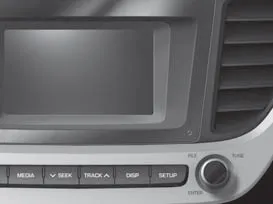
â– Type A
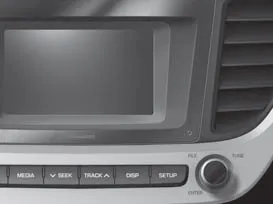
â– Type B
(5) DISP
- Turn the display on or off.
(6) SETUP
- Access Display, Sound, Date/Time, System, Screen Saver and Display Off settings.
(7) TUNE knob
- Turn to navigate through the stations/songs list.
- Press to select an item.
(8) RESET
- Shutdown and restart the system.
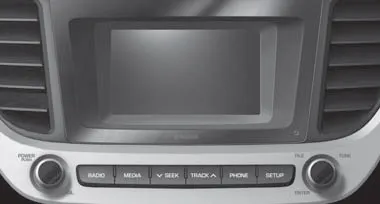
â– Type C
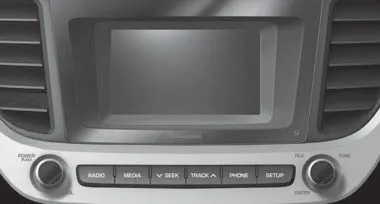
â– Type D
Feature of Your Audio ➤
Radio
You can listen to FM, AM and SiriusXM* radio in the Hyundai Accent, allowing you to switch between local broadcasts and subscription-based programming (if equipped).
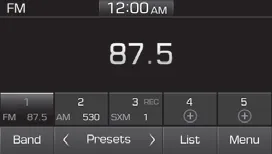
(1) Band
Switch between FM, AM and SiriusXM* radio.
(2) Presets
Change the preset number on the main screen so your Hyundai Accent favorites are always easy to reach.
(3) List
Display all available stations.
(4) Menu
Navigate to the menu screen.
(5) Presets 1~40
Save or listen to favorite stations. Setting up presets in your Hyundai Accent helps reduce time spent searching while driving.
Switching between FM, AM and SiriusXM* radio
- Press the [RADIO] button on the audio system to switch between FM, AM and SiriusXM* radio.
- Select [Band] on the screen to switch between FM, AM and SiriusXM* radio.
Searching stations
Searching stations by pressing the [SEEK/TRACK] button on the product. If reception is weak, moving to a more open area may improve station detection and audio clarity.
< Presets >
By selecting [< Presets >], the buttons for Presets 1~40 displayed on the screen can be changed, making it easier to access different preset pages.
Presets 1~40
Select the button to listen to a preset. Press and hold the button number to save the current station. If the slot is empty, simply selecting saves the station to the slot.
List
A list of all available stations is displayed. Select the desired station. Favorite stations can be saved to [Presets] by selecting the [+], which is a convenient way to build a personalized listening lineup for your Hyundai Accent.
Menu
Select [Menu], and select the desired function.
- Presets: Save up to 40 frequently used stations. To listen to a preset, select the desired station. Press and hold the desired slot from 1 through 40. This saves the current station in the selected slot. If the slot is empty, simply selecting saves the station to the slot.
- Scan: All stations available in the current location of the vehicle are played for five seconds each.
- Information: View detailed station information.
- Sound Settings: Audio sound settings can be changed.
- Station Info: Set whether to receive station information such as Station Name, Program Type or Information.
Information - SiriusXM® Satellite Radio information (if equipped)
• Satellite Radio channels:
Enjoy SiriusXM Satellite Radio with a 3-month trial subscription to the Sirius Select package. You’ll get over variable channels, including commercial free music, plus all your favorite sports, exclusive talk, entertainment, and a selection of premium programming. For more information and a complete list of SiriusXM channels, visit siriusxm.com in the United States, siriusxm.ca in Canada, or call SiriusXM at 1-888- 539-7474.
• Satellite Radio reception factors:
To receive the satellite signal, your vehicle has been equipped with a satellite radio antenna located on the roof of your vehicle. The vehicle roof provides the best location for an unobstructed, open view of the sky, a requirement of a satellite radio system. Like AM/FM, there are several factors that can affect satellite radio reception performance:
- Antenna obstructions: For optimal reception performance, keep the antenna clear of snow and ice build-up and keep luggage and other material as far away from the antenna as possible.
• SiriusXM Satellite Radio service:
SiriusXM is a subscription-based satellite radio service that broadcasts music, sports, news and entertainment programming to radio receivers, which are available for installation in motor vehicles or factory installed, as well as for the home, portable and wireless devices, and through an Internet connection on a personal computer.
Vehicles that are equipped with a factory installed SiriusXM Satellite Radio system include:
- Hardware and an introductory trial subscription term, which begins on the date of sale or lease of the vehicle.
- For a small upgrade fee, access to SiriusXM music channels, and other select channels over the Internet using any computer connected to the Internet (U.S. customers only).
• SiriusXM services require a subscription sold separately, or as a package, by Sirius XM Radio Inc. If you decide to continue service after your trial, the subscription plan you choose will automatically renew thereafter and you will be charged according to your chosen payment method at then-current rates. Fees and taxes apply. To cancel you must call SiriusXM at 1-866-635-2349. See SiriusXM Customer Agreement for complete terms at www.siriusxm. com. SiriusXM U.S. satellite and data services are available only in the 48 contiguous states, DC and Puerto Rico (with coverage limitations). SiriusXM satellite service is also available in Canada; see www.siriusxm.ca. All fees and programming subject to change. Sirius, XM and all related marks and logos are trademarks of Sirius XM Radio Inc.
Hyundai Accent tip: for the most stable satellite reception, avoid covering the roof antenna area with bulky cargo, and clear snow or ice from the antenna area whenever safe to do so.
SiriusXM Radio
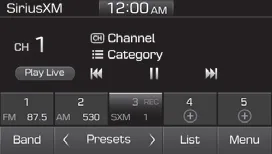
(1) Band
Switch between FM, AM and SiriusXM radio.
(2) Presets
Change the preset number on the main screen.
(3) List
Display all channels.
(4) Menu
Navigate to the menu screen.
(5) Presets 1~40
Save or listen to favorite channels.
(6) Play Live
Switches to the live broadcast mode.
(7) Skip Backward
Repeats the previously broadcasted program.
- Pressing the button: Moves to the previous segment.
- Pressing and holding the button (over 1.0 seconds): Moves to the previous 5 seconds.
(8) Play/Pause
Pauses/plays the current broadcasting program.
(9) Skip Forward
Moves to the next segment.
Switching between FM, AM and SiriusXM radio
- Press the [RADIO] button on the audio system to switch between FM, AM and SiriusXM radio.
- Select [Band] on the screen to switch between FM, AM and SiriusXM radio.
Searching channels
Press the [SEEK/TRACK] button to search channels. If you know the channel number, you may also use Direct Tune (if available on your Hyundai Accent system) to jump directly to the station.
< Presets >
By selecting [< Presets >], the buttons for Presets 1~40 displayed on the screen can be changed.
Presets 1~40
Select the button to listen to a preset. Press and hold the button number to save the current channel.
List
A list of all channels is displayed. Select the desired channel.
Favorite channels can be saved to [Presets] by selecting the [+].
Menu
Select [Menu], and select the desired function.
- Presets: Save up to 40 frequently used channels. To listen to a preset, select the desired channel. Press and hold the desired slot from 1 through 40. This saves the current channel in the selected slot. If the slot is empty, simply selecting saves the channel to the slot.
- Categories: Channels can be searched by category.
- Direct Tune: The desired channel can be selected by entering numbers.
- Sound Settings: Audio sound settings can be changed.
- Tag Song: Tag the current song information. When an Apple device (iPhone®, iPod®) is connected, tagged song information is sent automatically to the connected device.
Information
Up to 50 songs can be tagged.
- Scan: All channels available in the vehicle’s current location are played for ten seconds each.
- Program Schedule: View the Program schedule.
- Featured Favorites: The Featured Favorites feature allows SiriusXMâ„¢ to broadcast additional presets.
- Example 1: During holidays, "Holiday Music" might include all SiriusXMâ„¢ channels that are playing holiday music for easy access by users.
Multiple sets of Featured Favorites data can be broadcast by SiriusXMâ„¢ and can change from time to time. - Information: View detailed channel information.
- Category Lock: Search or scan channels in the current category only.
For everyday comfort in your Hyundai Accent, consider saving a mix of local traffic/news stations and favorite music channels so you can switch with a single tap.
Media ➤
Phone ➤
Setup
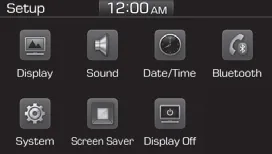
Use Setup to access Display, Sound, Date/Time, Bluetooth*, System, Screen Saver, and Display Off settings so you can personalize the Hyundai Accent audio system.
Press the [SETUP] button on the audio system to open the main Setup menu.
Display
Press the [SETUP] button on the audio system ➟ Select [Display] to adjust screen visibility and brightness behavior.
- Mode: Brightness is automatically adjusted according to headlight use, helping the Hyundai Accent screen remain comfortable day or night.
- Illumination: Manually change the brightness of the audio screen to suit your preference.
Sound
Press the [SETUP] button on the audio system ➟ Select [Sound] to fine-tune audio output for your Hyundai Accent cabin.
- Position: Adjust sound balance and fader so audio feels centered where you want it.
- Tone: Adjust tone color (such as bass/treble characteristics) for your preferred listening style.
- Back-up Warning Priority: Automatically lower audio volume while reversing so warnings are easier to hear.
- Speed Dependent Volume: Automatically adjust volume based on vehicle speed to help maintain consistent loudness.
- Beep: Choose whether a beep sound plays when the screen is touched.
Date/Time
Press the [SETUP] button on the audio system ➟ Select [Date/Time] to set the clock and calendar shown on the Hyundai Accent audio display.
- Set Time: Set the time displayed on the audio screen.
- Time Format: Choose between 12-hour and 24-hour time formats.
- Set Date: Set the date displayed on the audio screen.
WARNING
Date/Time Setting Distraction
Adjusting the date/time setting while driving can result in a loss of vehicle control that may lead to an accident, severe personal injury, and death.
Bluetooth
Press the [SETUP] button on the audio system ➟ Select [Bluetooth] to manage Bluetooth® Wireless Technology features on your Hyundai Accent.
- Connections: Control pairing, deletion, connection, and disconnection of Bluetooth® Wireless Technology devices.
- Auto Connection Priority: Set the connection priority of Bluetooth® Wireless Technology devices when the vehicle is started.
- Download Contacts: Contacts can be downloaded from connected Bluetooth® Wireless Technology devices (when supported).
- Bluetooth Voice Prompts: Play or mute voice prompts for Bluetooth® Wireless Technology device pairing, connection, and errors.
Information
- When paired devices are deleted, the call history and contacts of the device saved to the audio system are deleted.
- For Bluetooth® Wireless Technology connections with low connection priority, some time may be required for the connection to be established.
- Contacts can be downloaded only from the currently connected Bluetooth® Wireless Technology device.
- If no Bluetooth® Wireless Technology device is connected, the Download Contacts button is disabled.
System
Press the [SETUP] button on the audio system ➟ Select [System] to view system details and manage updates for the Hyundai Accent audio unit.
- Memory Information: View My Music memory usage.
- Language: Change the user language.
- System Information: At the System Information screen, software version information and update availability are shown.
- System Update: At the System Information screen, insert the USB memory with the latest file downloaded, and then select [Update] to begin updating. The system will then reboot automatically.
Information
- This product needs supplemented software updates and additional functions, which collectively may take some time to complete, depending on the amount of data.
- If the Power is disconnected or the USB is removed during an update, the data might be damaged. Please wait until the update is complete while engine is on.
Screen Saver
Set the information displayed when the audio system is switched off or the screen is turned off, so your Hyundai Accent display shows exactly what you want when inactive.
Press the [SETUP] button on the audio system ➟ Select [Screen Saver].
- Analog: An analog clock is displayed.
- Digital: A digital clock is displayed.
- None: No information is displayed.
Display Off
To prevent glare, the screen can be turned off while the audio system continues operating (useful for night driving in the Hyundai Accent).
Press the [SETUP] button on the audio system ➟ Select [Display Off].
Information
Use ‘Screen Saver’ to set the information to be displayed when the screen is turned off.
FCC Warning
This equipment has been tested and found to comply with the limits for a Class B digital device, pursuant to part 15 of the FCC Rules. These limits are


Other information:
Hyundai Accent (HC) (2017 - 2022) Owner's Manual: Description and Operation
- Function NoItemDescription 1Washer Linked Wiper – If the washer switch is pressed ON for 0.06 second with the vehicle mode in IGN2, the wiper relay is turned ON after washer switch ON, and then the wiper relay is turned OFF after wiper parking signal ON. 2MIST Linked Wiper – If the wiper mist switch is pressed ON for 0.6 second with the vehicle mode in IGN2, the wiper relay is turned ON, and then OFF after wiper parking signal ON.If your vehicle is equipped with a sunroof, you can slide or tilt your sunroof with the sunroof switch located on the overhead console. In your Hyundai Accent, always make sure the opening is clear before operating the sunroof or sunshade. The sunroof can only be operated when the ignition switch is in the ON position. The sunroof can be operated for approximately 30 seconds after the ignition switch is in the ACC or LOCK position.
Contents
Categories
- Manuals Home
- Hyundai Accent Owners Manual
- Hyundai Accent Service Manual
- Questions & Answers
- Video Guides
- Useful Resources
- New on site
- Most important about car
- Privacy Policy

0.01