
Hyundai Accent (HC): Accessing your vehicle / Smart Key
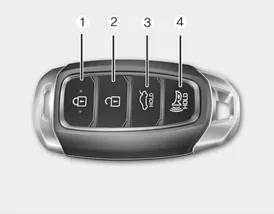
Some Hyundai Accent models use a Smart Key, which you can use to lock or unlock a door (and trunk) and start the engine. For best performance, keep the Smart Key close to you and avoid storing it near strong electromagnetic sources.
1. Door Lock
2. Door Unlock
3. Trunk Unlock
4. Panic
Locking
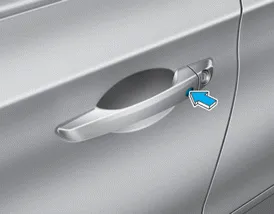
To lock your Hyundai Accent using the Smart Key system:
1. Close all doors, the hood, and the trunk to make sure the Hyundai Accent can confirm a complete lock request.
2. Either press the door handle button, or press the Door Lock button (1) on the smart key while standing near your Hyundai Accent.
3. The hazard warning lights will blink and the chime will sound once, indicating the Hyundai Accent has received the locking signal.
4. When the doors are locked, the indicator light on the central door lock/unlock switch will be illuminated. Also verify locking by checking the inside door lock button position.
Information
The door handle button will only operate when the smart key is within 28~40 inches (0.7~1 m) from the outside door handle.
Even if you press the outside door handle button, the doors will not lock and the chime will sound for about three seconds if any of the following conditions apply:
- The Smart Key is in the vehicle.
- The Engine Start/Stop button is in ACC or ON position.
- Any door except the trunk is open.
For day-to-day convenience, make it a habit to listen for the confirmation chime and look for the hazard light flash; it is a quick way to confirm your Hyundai Accent is secured before you walk away.
WARNING
Do not leave the Smart Key in your vehicle with unsupervised children. Unattended children could press the Engine Start/Stop button and may operate power windows or other controls, or even make the vehicle move, which could result in serious injury or death.
Unlocking
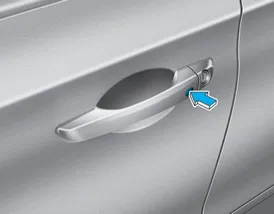
To unlock your Hyundai Accent:
1. Carry the Smart Key with you.
2. Either press the driver's outside door handle button or press the Door Unlock button (2) on the smart key.
3. The driver's door will unlock and the hazard warning lights will blink two times so you can easily recognize that your Hyundai Accent has unlocked.
Two press unlock setting:
If you press the driver's outside door handle button or the Door Unlock button on the smart key again within four seconds, then all the doors will unlock.
Two press unlock setting can be changed according to owner preference in the cluster User Settings mode or with the smart key, allowing you to choose between added security (driver door first) or quicker access (all doors).
• User settings mode method:
Select or deselect the 'Two Press Unlock' feature in the User Settings mode on the cluster LCD display (User Settings âžž Door âžž Two Press Unlock).
• Smart key method:
Press and hold both Door Lock (1) and Door Unlock (2) buttons at the same time until the hazard warning lights blink. Now all doors will unlock when the Door Unlock button is pressed one time.
To change the setting back, repeat this procedure.
Information
- The door handle button will only operate when the smart key is within 28~40 inches (0.7~1 m) from the outside door handle and other people can also open the doors.
- If you press the front passenger's outside door handle while carrying the Smart Key, all doors will unlock.
- After unlocking the doors, the doors will lock automatically after 30 seconds unless a door is opened.
- Either the driver or front passenger door can be opened with the door handle button when the smart key is within this range.
Trunk opening
To open:
1. Carry the smart key.
2. Either press the trunk handle button or press and hold the Trunk Unlock button (3) on the smart key for more than one second.
3. The hazard warning lights will blink two times and the trunk will be unlocked for access.
Once the trunk is opened and then closed, the trunk will lock automatically, helping keep your Hyundai Accent cargo area secure.
Information
The trunk handle button will only operate when the smart key is within 28 inches (0.7 m) from the trunk handle.
Panic button
Press and hold the Panic button (4) for more than one second. The horn sounds and hazard warning lights blink for about 30 seconds. To cancel the panic mode, press any button on the Smart Key.
Start-up
You can start the vehicle without inserting the key. Keep the Smart Key inside the Hyundai Accent and follow the Engine Start/Stop button procedure described in the appropriate chapter of this Owner’s Manual.
NOTICE
To prevent damaging the smart key:
- Keep the smart key away from any liquid or fire. Internal circuits may malfunction if the inside of the smart key gets damp (from liquids or moisture) or if it is heated. This can exclude the smart key from warranty coverage.
- Avoid dropping or throwing the smart key.
- Protect the smart key from extreme temperatures.
Mechanical key
If the Smart Key does not operate normally, you can still lock or unlock the driver's door by using the mechanical key built into the Smart Key, which is a helpful backup for Hyundai Accent owners.
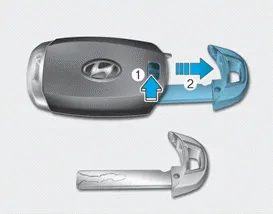
Move the release lever in the direction of the arrow (1) and then remove the mechanical key (2). Insert the mechanical key into the key hole on the door.
To reinstall the mechanical key, put the key into the hole and push it until a click sound is heard so it locks back into the Smart Key.
Loss of a smart key
A maximum of two Smart Keys can be registered to a single vehicle. If you lose your smart key, act quickly: take the Hyundai Accent and the remaining key to an authorized HYUNDAI dealer, or have the vehicle towed if necessary, so the lost key can be deactivated and new keys can be registered securely.
Smart key precautions
The smart key may not work if any of the following occur:
- The smart key is close to a radio transmitter such as a radio station or an airport which can interfere with normal operation of the transmitter.
- The smart key is near a mobile two way radio system or a cellular phone.
- Another vehicle’s smart key is being operated close to your vehicle.
If the smart key does not work correctly, open and close the door with the mechanical key. If you continue to have a problem with the smart key, contact an authorized HYUNDAI dealer for inspection and proper diagnosis.
If the smart key is in close proximity to your mobile phone, the signal could be blocked by your mobile phone's normal operational signals. This is specifically relevant when the phone is active such as making and receiving calls, text messaging, and/or sending/receiving emails. Avoid placing the smart key and your mobile phone in the same location and always try to maintain an adequate distance between the two devices, especially in a crowded pocket, bag, or console area.
NOTICE
Keep the smart key away from electromagnetic materials that blocks electromagnetic waves to the key surface. For best Hyundai Accent Smart Key performance, store it away from strong magnets, shielding cases, and heavy metal objects.
NOTICE
Always have the smart key with you when leaving the vehicle. If the smart key is left near the vehicle, the vehicle battery may be discharged; for longer parking periods, keep the Smart Key a reasonable distance away from the Hyundai Accent.
Information
This device complies with Part 15 of the FCC rules.
Operation is subject to the following three conditions:
1. This device may not cause harmful interference, and
2. This device must accept any interference received, including interference that may cause undesired operation.
3. Changes or modifications not expressly approved by the party responsible for compliance could void the user's authority to operate the device.
Battery replacement
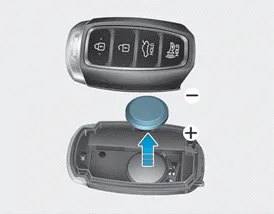
If the Hyundai Accent Smart Key is not operating as expected, the first and simplest step is often to replace the battery. Use a new battery of the correct type: CR2032. A fresh battery helps restore normal lock/unlock range and reliable Smart Key detection.
To replace the battery:
1. Remove the mechanical key from the Smart Key.
2. Using a slim, non-marring tool, carefully pry open the rear cover of the smart key.
3. Remove the old battery and install the new battery. Make sure the battery polarity and position are correct so the contacts seat properly.
4. Reinstall the rear cover of the smart key until it is fully closed and secured.
If you believe your smart key may have been damaged (for example, from dropping it, moisture exposure, or impact), or if the Hyundai Accent Smart Key still does not work correctly after battery replacement, contact an authorized HYUNDAI dealer for inspection and assistance.
Information
An inappropriately disposed battery can be harmful to the environment and human health. Dispose of the battery according to your local law(s) or regulations. When possible, use an approved battery recycling collection point.


Other information:
Categories
- Manuals Home
- Hyundai Accent Owners Manual
- Hyundai Accent Service Manual
- Questions & Answers
- Video Guides
- Useful Resources
- New on site
- Most important about car
- Privacy Policy

0.0082