
Hyundai Accent (HC): Engine Electrical System / Starting System
Contents:
Description and Operation
Starter ➤
Starter Relay
1.Turn ignition switch OFF and disconnect the negative (-) battery terminal.
2.Remove the fuse box cover.
3.Remove the starter relay (A).
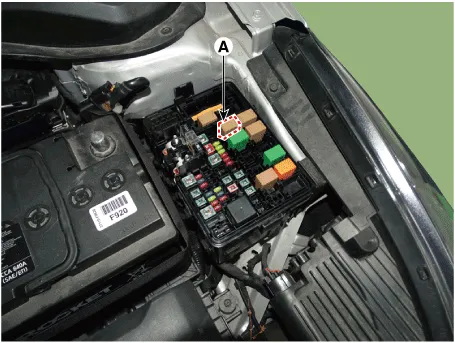
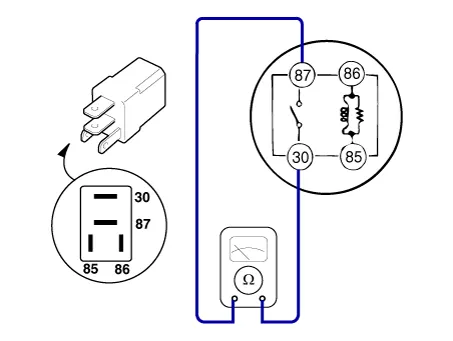
4.Check for continuity between the terminals (30 and 87) using an ohmmeter.
| Terminal | Resistance | Measure |
| 30 - 87 | 1MΩ or higher | If there is continuity between the terminals, replace the relay. |
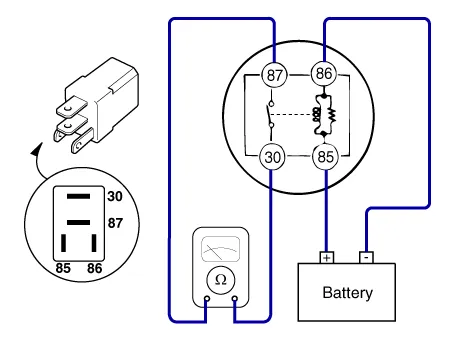
5.Apply 12V to the terminal 85 and ground to the terminal 86 and then check for continuity between the terminals (30 and 87).
| Terminal | Resistance | Measure |
| 30 - 87 | 1Ω or less | If there is no continuity between the terminals, replace the relay. |
6.Install the starter relay.
7.Install the fuse box cover.


Other information:
Hyundai Accent (HC) (2017 - 2022) Service Manual: Description and Operation
- Description of ESP Optimum driving safety now has a name : ESP, the Electronic Stability Program.ESP recognizes critical driving conditions, such as panic reactions in dangerous situations, and stabilizes the vehicle by wheel-individual braking and engine control intervention with no needfor actuating the brake or the gas pedal.ESP adds a further function known as Active Yaw Control (AYC) to the ABS, TCS, EBD and ESP functions.Hyundai Accent (HC) (2017 - 2022) Service Manual: Remote Key
The Hyundai Accent is equipped with a convenient remote key that lets you lock or unlock a door (and the trunk) quickly, and on some Hyundai Accent configurations it can also be used as part of the normal engine-start procedure. Keep the remote key with you so you can access your Hyundai Accent safely and efficiently wherever you park. 1. Door Lock 2.
Contents
Categories
- Manuals Home
- Hyundai Accent Owners Manual
- Hyundai Accent Service Manual
- Questions & Answers
- Video Guides
- Useful Resources
- New on site
- Most important about car
- Privacy Policy

0.0121