
Hyundai Accent (HC): Convenience Features of Your Vehicle / Trip computer
Contents:
Type A
The trip computer is a microcomputer-controlled driver information system that displays driving-related information to help you monitor efficiency and trip progress in your Hyundai Accent.
Information
Some stored trip computer values (for example, Average Vehicle Speed) may reset if battery power is disconnected.
Trip modes
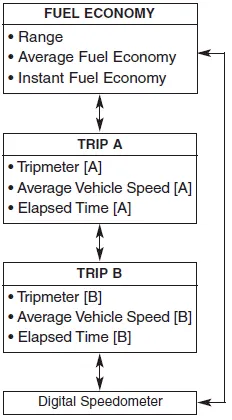
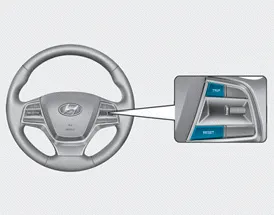
To switch between trip modes, press the TRIP button on the steering wheel.
Range
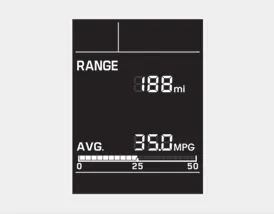
Range (1)
• Range is the estimated distance the vehicle can be driven using the remaining fuel in the tank.
- Distance range:
1 ~ 9999 mi. or 1 ~ 9999 km
• If the estimate falls below 1 mi. (1 km), the trip computer displays "----" for the range value.
Information
- If the vehicle is parked on an incline or battery power has been interrupted, the range calculation may not be accurate.
- Because range is an estimate, the displayed value may differ from the actual distance you can drive.
- The trip computer may not detect newly added fuel if less than 1.6 gallons (6 liters) is added.
- Fuel economy and range can vary significantly depending on traffic, weather, driving habits, and the overall condition of the Hyundai Accent.
Average Fuel Economy (2)
• Average fuel economy is calculated using total driving distance and fuel consumption since the last reset.
- Fuel economy range: 0.0 ~ 99.9 MPG
• To clear average fuel economy manually, press and hold the RESET button on the steering wheel for more than 1 second while the average fuel economy screen is displayed.
Instant Fuel Economy (3)
This mode shows instantaneous fuel economy while driving when the vehicle speed is greater than 6.2 mph [10 kph].
- Fuel economy range: 0 ~ 50 MPG
Trip A/B
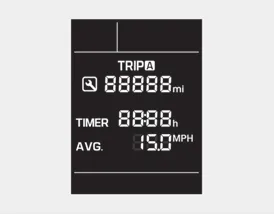
Tripmeter (1)
- The tripmeter records the driving distance since the last tripmeter reset.
- Distance range:
0.0 ~ 9999.9 mi. or km - To reset the tripmeter, press and hold the RESET button on the steering wheel for more than 1 second while the tripmeter is displayed.
Elapsed Time (2)
- Elapsed time is the total driving time since the last elapsed time reset.
- Time range (hh:mm): 00:00 ~ 99:59 - To reset elapsed time, press and hold the RESET button on the steering wheel for more than 1 second while elapsed time is displayed.
Information
Elapsed time continues to count while the engine is running, including when the Hyundai Accent is stopped in traffic or waiting at a traffic light.
Average Vehicle Speed (3)
- Average vehicle speed is calculated using total driving distance and driving time since the last reset.
- Speed range: 0~160 MPH or 0~260 km/h - To reset average vehicle speed, press and hold the RESET button on the steering wheel for more than 1 second while average vehicle speed is displayed.
Information
- Average vehicle speed is not displayed until the driving distance exceeds 0.19 miles (300 meters) after the ignition switch or Engine Start/Stop button is turned to ON.
- If the vehicle is stopped while the engine is still running, the calculated average speed will continue updating and may gradually decrease (for example, in traffic).
Information
Small addition for Hyundai Accent owners: for the most consistent trip computer readings, reset Trip A/B at the start of each long trip and avoid frequent short refueling “top-offs� under 1.6 gallons (6 liters), since the system may not register them as a refuel event.
Service information
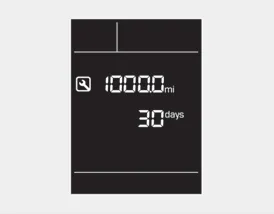
On the Hyundai Accent, the service reminder becomes active as you approach your next maintenance point. When the remaining distance or time reaches 900 miles (1,500 km) or 30 days, the service symbol (
 ) will blink for several seconds each time you turn the ignition switch or Engine Start/Stop button to the ON position, helping you plan service before it is due.
Information
To adjust, change, or deactivate the service interval schedule, consult an authorized HYUNDAI dealer so the settings match your Hyundai Accent maintenance plan and local conditions.
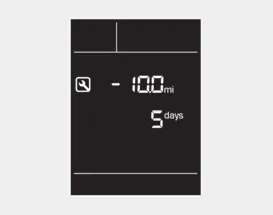
If you go beyond the specified interval, the service symbol (
 ) will blink each time you switch the vehicle ON, indicating that scheduled service has been exceeded.
To reset the service interval, press and hold the RESET button for more than 5 seconds. When the miles and days begin to blink, press and hold the RESET button again for more than 1 second to confirm the reset.
If the service interval feature is not set, the service symbol (
 ) will not be shown on the display.
Digital speedometer
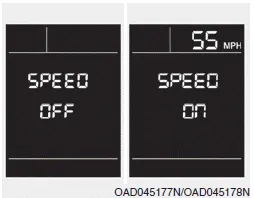
This screen provides a clear digital readout of Hyundai Accent vehicle speed (in mph), which can be easier to glance at than an analog dial in some driving situations.
To switch the digital speedometer ON or OFF, press and hold the RESET button for more than 1 second while the digital speedometer screen is displayed.
Type B
The Type B trip computer in the Hyundai Accent is a microcomputer-controlled driver information system designed to present useful driving data, including fuel economy, distance, and time information, to support daily driving and trip planning.
Information
Some stored trip computer values (for example, Average Vehicle Speed) may reset if the battery is disconnected or power is interrupted.
Trip modes
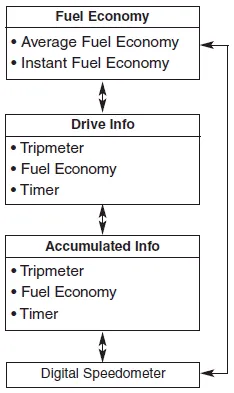
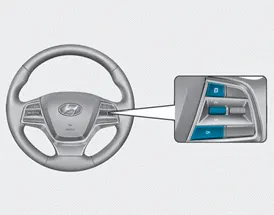
To change the trip mode, toggle the
"
 ,
,
 " switch on the steering wheel to move through available trip pages.
Average fuel economy/ Instant fuel economy
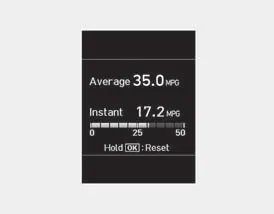
Average Fuel Economy (1)
- The average fuel economy is calculated from total driving distance and total fuel used since the last average fuel economy reset, giving a broader efficiency picture for your Hyundai Accent.
- The average fuel economy can be reset either manually or automatically, depending on the option you select in the settings.
Manual reset
To clear the average fuel economy manually, press and hold the OK button on the steering wheel for more than 1 second while the average fuel economy screen is displayed.
Automatic reset
To have the Hyundai Accent reset the average fuel economy automatically, choose "After Ignition" or "After Refueling" in the User Settings mode on the LCD display.
- After Ignition: When the engine has been OFF for 4 hours or longer, the average fuel economy will reset automatically.
- After Refueling: The average fuel economy will reset automatically after adding 1.6 gallons (6 liters) of fuel or more and after driving speed exceeds 1 mph (1 km/h).
Information
The vehicle must be driven at least 0.19 miles (300 meters) after the last ignition key cycle before the average fuel economy value will be recalculated.
Instant Fuel Economy (2)
• This mode shows instantaneous fuel economy while driving, allowing you to see how throttle input, speed changes, and road grade affect efficiency in real time.
Accumulated Info display
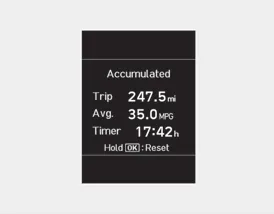
This display summarizes accumulated driving information: trip distance (1), average fuel economy (2), and total driving time (3).
The information is accumulated from the last reset, so it is useful for tracking longer periods such as a week of commuting or a full road trip in your Hyundai Accent.
To manually reset the values, press and hold the OK button while viewing Accumulated driving info. Trip distance, average fuel economy, and total driving time will reset at the same time.
The accumulated driving information continues counting while the engine is running (for example, when the vehicle is in traffic or stopped at a stop light).
Information
The vehicle must be driven at least 0.19 miles (300 meters) after the last ignition key cycle before the average fuel economy will be recalculated.
Drive Info display
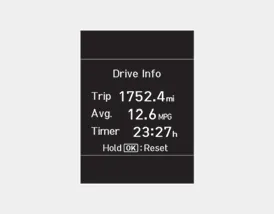
This display shows trip distance (1), average fuel economy (2), and total driving time (3) for the current driving session.
The information is combined per ignition cycle. However, if the engine has been OFF for 4 hours or longer, the Drive Info screen will reset automatically the next time you start the Hyundai Accent.
To manually reset the values, press and hold the OK button while viewing Drive Info. Trip distance, average fuel economy, and total driving time will reset simultaneously.
The driving information continues to be counted while the engine is still running (for example, when the vehicle is in traffic or stopped at a stop light).
Information
The vehicle must be driven at least 0.19 miles (300 meters) after the last ignition key cycle before the average fuel economy will be recalculated.
Digital speedometer
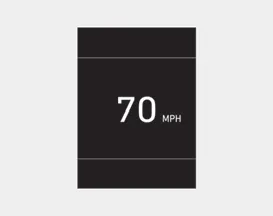
This screen shows the vehicle speed as a digital value for quick reading while driving.


Other information:
The Smartstream Intelligent Variable Transmission (Smartstream IVT) in the Hyundai Accent automatically adjusts its driving ratios based on vehicle speed and accelerator pedal position. The appropriate “speed� (ratio) is selected automatically according to the shift lever position and current driving conditions, helping deliver smooth acceleration and efficient performance.Hyundai Accent (HC) (2017 - 2022) Owner's Manual: General Service Information
- General Service Information Protection of the VehicleAlways be sure to cover fenders, seats, and floor areas prior to beginning work. • The support rod must be inserted into the hole near the edge of the hood whenever you inspect the engine compartment to prevent the hood from falling and causing possible injury. • Make sure that the support rod has been released prior to closing the hood.
Contents
Categories
- Manuals Home
- Hyundai Accent Owners Manual
- Hyundai Accent Service Manual
- Questions & Answers
- Video Guides
- Useful Resources
- New on site
- Most important about car
- Privacy Policy

0.01