
Hyundai Accent (HC): LCD Display / LCD Display Modes
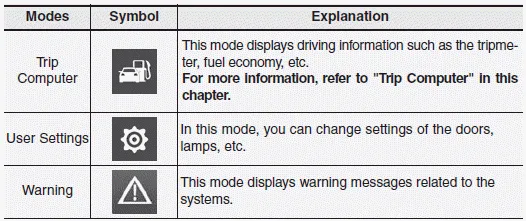
The information provided may differ depending on which functions and options are available for your specific Hyundai Accent configuration.
Engage parking brake to edit settings/Shift to P to edit settings
This warning message appears if you attempt to adjust User Settings while driving.
- Manual transmission
For your safety, change User Settings only after parking the vehicle, applying the parking brake, and moving the shift lever to neutral.
- Intelligent variable transmission
For your safety, change User Settings only after parking the vehicle, applying the parking brake, and moving the shift lever to P (Park).
Information
If several alerts appear at the same time, use the MODE/MOVE controls to review them one by one and address any safety-related message before continuing your trip.
Quick guide help
This mode offers short, built-in walkthroughs for key features found in the User Settings menu of your Hyundai Accent, so you can quickly understand what each setting does before you change it.
Select the item you want to learn about, then press and hold the OK button to open the quick guide.
Trip computer mode
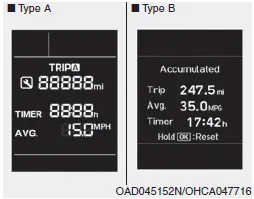
The trip computer mode shows practical driving data for the Hyundai Accent, including fuel economy readings, tripmeter values, elapsed time, and other information related to vehicle speed and recent driving performance.
Assist mode
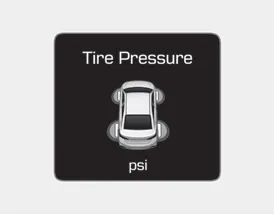
Tire Pressure
This section displays tire pressure-related information, helping you monitor the condition of each tire and supporting safer daily driving.
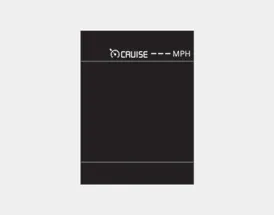
Cruise control
This section shows the current cruise control status, such as whether the system is on and whether a speed is set (if equipped on your Hyundai Accent).
Warning mode
If any of the following conditions occur, the Hyundai Accent will display warning messages on the LCD for several seconds to draw your attention.
- Low washer fluid (if equipped)
- Tire Pressure Monitoring System (TPMS) malfunction
- Forward Collision-avoidance Assist (FCA) warning or malfunction (if equipped)
User settings mode
In this mode, you can personalize multiple vehicle options for the Hyundai Accent, including the instrument cluster behavior, door locking logic, exterior/interior lamp features, and other convenience settings.
1. Driving Assist
2. Door
3. Lights
4. Convenience
5. Service Interval
6. Other
7. Reset
The information shown may differ depending on the Hyundai Accent trim level and which options are equipped.
1. Driving Assist
• Forward Collision-avoidance Assist (FCA)
Use this item to turn Forward Collision-avoidance Assist (FCA) on or off, depending on your preference and driving conditions.
2. Door
• Auto Lock
- Enable on Speed: All doors automatically lock when vehicle speed exceeds 9.3 mph (15 km/h).
- Enable on Shift: All doors automatically lock when the intelligent variable transmission (IVT) shift lever is moved from P (Park) to R (Reverse), N (Neutral), or D (Drive). (Works only when the engine is running. Vehicles with a manual transmission do not support this function.)
• Auto Unlock
- Disable: Cancels automatic door unlock operation.
- On Key Out: All doors automatically unlock when the ignition key is removed from the key ignition switch (remote key vehicles, if equipped).
- Vehicle Off: All doors automatically unlock when the Engine Start/Stop button is set to OFF (smart key vehicles, if equipped).
- On Shift to P: All doors automatically unlock when the IVT shift lever is moved to P (Park). (Works only when the engine is running. Vehicles with a manual transmission do not support this function.)
• Two Press Unlock
- Off: Disables the two-press unlock feature; pressing the unlock button unlocks all doors at once.
- On: Pressing the unlock button unlocks only the driver’s door; pressing it again within 4 seconds unlocks the remaining doors.
• Smart Trunk(for Smart key)
Use this option to enable or disable the Smart Trunk feature (smart key vehicles). This can be useful if you regularly load cargo or if you want to prevent unintended trunk opening in tight spaces.
3. Lights
• One Touch Turn Signal
- Off: Turns off the one-touch turn signal function.
- 3, 5, 7 Flashes: The turn signal indicator will blink 3, 5, or 7 times when the turn signal lever is tapped lightly.
• Headlight Delay
If this item is checked, the Headlight Delay feature is enabled, allowing the lights to remain on briefly after you exit the Hyundai Accent (as equipped).
4. Convenience
• Wiper/Lights Display
Enable or disable the Wiper/Light mode display.
When activated, the LCD will briefly show the selected wiper or exterior lighting mode each time you change the setting.
• Gear Position Pop-up
Enable or disable the gear position pop-up display.
When activated, the current gear position will appear on the LCD display (IVT vehicles, if equipped).
5. Service Interval
• Service Interval
Enable or disable service interval reminders.
• Adjust Interval
When the service interval menu is active, you can set the time and distance values used for reminders.
Information
For best accuracy and to match local maintenance recommendations, consult an authorized HYUNDAI dealer when setting service interval values.
When the service interval is enabled and configured, reminder messages can appear each time the vehicle is started.
- Service in
: Displays the remaining mileage and remaining days until service is due.
- Service required
: Displays when the mileage and/or days to service have been reached or exceeded.
Information
If any of the following conditions occur, the displayed mileage and days to service may be inaccurate.
- The battery cable is disconnected.
- The fuse switch is turned off.
- The battery is discharged.
6. Other
• Fuel Econ. Reset
- Off: Average fuel economy will not reset automatically after refueling.
- After Ignition: If the engine has been OFF for 4 hours or longer, the average fuel economy resets automatically.
- After Refueling: Average fuel economy resets automatically after adding 1.6 gallons (6 liters) of fuel or more and after vehicle speed exceeds 1 mph (1 km/h).
• Fuel Econ. Unit
Select the fuel economy unit (US gallon, UK gallon).
• Temperature Unit
Select the temperature unit (°C, °F).
• Language
Select the display language.
7. Reset
This function restores User Settings to factory defaults. All menus in User Settings Mode are reset, except language and service interval settings.


Other information:
Hyundai Accent (HC) (2017 - 2022) Owner's Manual: Seat Belt Restraint System
In the Hyundai Accent, the seat belt restraint system is designed to hold occupants in the correct position during everyday driving and to help reduce injury risk in a sudden stop or collision. For the best protection, always wear your seat belt correctly and confirm every passenger is properly buckled up before the Hyundai Accent starts moving. WARNING Improperly positioned seat belts may increase the risk of serious injury in an accident.Hyundai Accent (HC) (2017 - 2022) Owner's Manual: Tire Replacement
On the Hyundai Accent, a tire that wears evenly will eventually reveal the built-in tread wear indicators. These indicators appear as a solid, continuous band across the tread and confirm there is less than 2/32 inch (1.6 mm) of usable tread remaining. Replace the tire when this happens to help maintain safe braking performance, stable steering control, and reliable wet-weather traction.
Categories
- Manuals Home
- Hyundai Accent Owners Manual
- Hyundai Accent Service Manual
- Questions & Answers
- Video Guides
- Useful Resources
- New on site
- Most important about car
- Privacy Policy

0.0107