
Hyundai Accent (HC): Convenience Features of Your Vehicle / LCD Display
Hyundai Accent (HC) (2017 - 2022) Owner's Manual / Convenience Features of Your Vehicle / LCD Display
Contents:
LCD Display Control
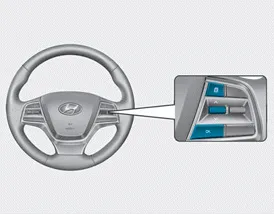
The LCD display modes can be changed using the control buttons, allowing you to switch screens and adjust settings.
(1)
 : MODE button for changing modes
(2)
 ,
,
 : MOVE switch for changing items
(3) OK : SELECT/RESET button for setting or resetting the selected item
LCD Display Modes ➤


Other information:
Hyundai Accent (HC) (2017 - 2022) Owner's Manual: Crankshaft
- Disassembly • Use fender covers to avoid damaging painted surfaces. • To avoid damage, unplug the wiring connectors carefully while holding the connector portion. • Mark all wiring connector and hoses to avoid misconnection. • To release the fuel system pressure before removing the engine assembly, start the engine without fuel pump relay.Hyundai Accent (HC) (2017 - 2022) Owner's Manual: Repair procedures
- Removal 1.Remove the air cleaner assembly.(Refer to Engine Mechanical System - "Air cleaner") 2.Remove the battery and battery tray.(Refer to Body Electrical System - "Battery") 3.Drain the coolant.(Refer to Engine Mechanical System - "Coolant") 4.Disconnect the position switch connector (A). 5.Disconnect the driven pully speed sensor connector (B).
Contents
Categories
- Manuals Home
- Hyundai Accent Owners Manual
- Hyundai Accent Service Manual
- Questions & Answers
- Video Guides
- Useful Resources
- New on site
- Most important about car
- Privacy Policy

Copyright © 2026
0.0094
0.0094