
Hyundai Accent (HC): Lighting / Exterior Lights
Lighting control
To operate exterior lighting on the Hyundai Accent, rotate the knob at the end of the control lever to one of the positions listed below. The available positions may differ by type and equipment.
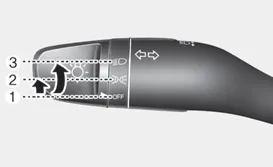
â– Type A
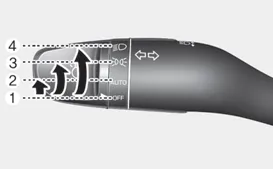
â– Type B
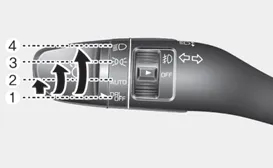
â– Type C
Type A
(1) OFF position
(2) Parking lamp position
(3) Headlamp position
Type B
(1) OFF position
(2) AUTO light position
(3) Parking lamp position
(4) Headlamp position
Type C
(1) DRL OFF position
(2) AUTO position
(3) Parking lamp position
(4) Headlamp position
Daytime running light (DRL)
The Daytime Running Lights (DRL) help other road users notice the front of your Hyundai Accent during daytime driving, particularly in low-angle light after dawn and before sunset.
The DRL system will turn the dedicated lamp OFF when :
- The light switch is in the DRL OFF position.
- The headlamps are ON.
- The parking lamps are ON.
- The vehicle is turned off.
- The parking brake is set.
AUTO light position
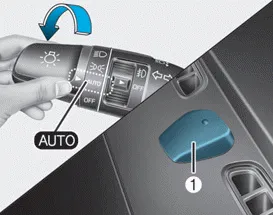
In AUTO, the parking lamps and headlamps switch ON or OFF automatically based on outside brightness detected by the sensor, supporting convenience in changing light conditions.
Even when AUTO is active, manually switch the lamps ON when driving at night, in fog, during heavy rain, or when entering darker areas such as tunnels and parking facilities, where visibility changes quickly.
NOTICE
- Do not cover the sensor (1) in front of the instrument panel, and do not spill liquids onto it, as this can affect automatic light operation.
- Do not clean the sensor with window cleaner; it may leave a film that interferes with sensor performance.
- If your Hyundai Accent has window tint or a metallic coating on the windshield, AUTO light function may not operate correctly.
Parking lamp position (
 )
)
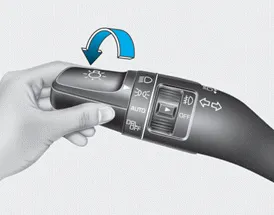
When set to the parking lamp position, the parking lamps, license plate lamp, and instrument panel illumination are turned ON.
Headlamp position (
 )
)
When set to the headlamp position, the headlamps, parking lamps, license plate lamp, and instrument panel illumination are turned ON.
Information
The ignition switch must be in the ON position to turn on the headlamps.
High beam operation
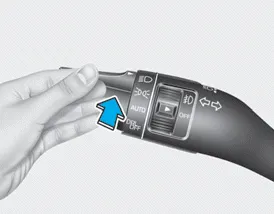
To switch the Hyundai Accent high beams ON, push the lever away from you. The lever returns to its original position after the action.
The high beam indicator illuminates when the headlamp high beams are active.
To switch high beams OFF, pull the lever toward you; the low beams will come back on.
WARNING
Do not use high beams when other vehicles are approaching. High beams can reduce the other driver’s visibility and increase the risk of an accident.
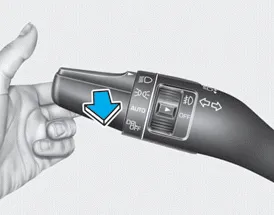
To flash the high beams (flash-to-pass), pull the lever toward you and then release it. The high beams stay ON only while you hold the lever toward you.
Information
Small addition for Hyundai Accent owners: if AUTO lights are equipped, keep the windshield area near the sensor clean and avoid placing dash covers over the sensor zone, since that can delay headlamp activation when entering tunnels or shaded roads.
Front fog lamp

On the Hyundai Accent, front fog lamps are designed to improve forward visibility when driving conditions are poor due to fog, heavy rain, snow, or similar low-visibility situations. These lamps emit a wide, low beam that reduces light reflection from fog or precipitation. Use the switch located next to the headlamp control to turn the fog lamps ON or OFF as needed.
1. Switch on the parking lamps.
2. Rotate the light switch (1) to the front fog lamp position.
3. To turn the front fog lamps OFF, rotate the light switch to the front fog lamp position again or turn the parking lamps OFF completely.
NOTICE
When operating, the fog lamps draw a relatively high amount of electrical power. To avoid unnecessary battery load and improve overall efficiency of your Hyundai Accent, use the fog lamps only when visibility is significantly reduced.
Turn signals and lane change signals
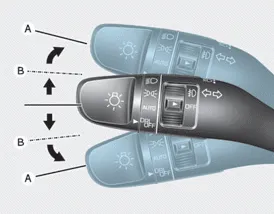
To indicate a turn on the Hyundai Accent, move the turn signal lever downward for a left turn or upward for a right turn to position (A). The corresponding indicator will flash on the instrument cluster to inform other road users of your intended direction.
If a turn signal indicator remains illuminated without flashing, flashes rapidly, or does not illuminate at all, this may indicate a malfunction such as a burned-out bulb. In such cases, the affected turn signal bulb should be inspected and replaced.
One-touch turn signal function
The One-touch Turn Signal function allows quick lane change signaling without fully engaging the lever. To activate this feature, lightly push the turn signal lever upward or downward to position (B) and then release it.
The lane change indicators will flash automatically 3, 5, or 7 times, depending on the selected setting.
You can enable or disable the One-touch Turn Signal function, or select the preferred number of flashes (3, 5, or 7), through the User Settings mode under the Light menu on the LCD display of your Hyundai Accent.
Battery saver function
The battery saver function on the Hyundai Accent is designed to help prevent unnecessary battery discharge when the vehicle is parked. This system automatically turns OFF the parking lamps when the engine is turned off and the driver-side door is opened.
With this feature active, the parking lamps will switch off automatically if the vehicle is parked on the roadside at night, helping protect the battery from excessive drain.
However, the position lamps will remain ON even after the driver-side door is opened if the light switch is set to the position lamp or AUTO position (if equipped) after the engine has been turned off.
If it is necessary to keep the lamps ON after the engine is shut down, turn the position lamps OFF and then ON again using the light switch on the steering column once the engine has been turned off.
Information
Small addition for Hyundai Accent owners: prolonged use of exterior lighting while the engine is off can reduce battery capacity, especially in cold weather, so it is recommended to start the engine periodically if lights must remain on for an extended time.
Headlamp delay function
In the Hyundai Accent, the Headlamp Delay feature can keep the headlamps (and/or parking lamps) illuminated for about 5 minutes after the key is removed from the ignition switch, or after the ignition is placed in ACC or LOCK/OFF with the headlamps still ON. For quicker shutoff, if the driver’s door is opened and then closed, the headlights will turn off after about 15 seconds. With the engine already off, opening and closing the driver’s door will also turn the headlamps (and/or parking lamps) off after about 15 seconds.
You can switch the Hyundai Accent headlamps (and/or parking lamps) off sooner by pressing the LOCK button on the remote key or smart key twice, or by turning the light switch to the OFF or AUTO position (if equipped). The Headlamp Delay feature can also be activated or deactivated through User Settings Mode (Light) on the cluster LCD display, allowing you to match the timing to your driving and parking routine.
NOTICE
If the driver exits the vehicle through a door other than the driver’s door, the battery saver function may not operate and the headlamp delay function may not turn off automatically. This can discharge the battery. Before leaving your Hyundai Accent, make sure the lamps are turned off if you are not using the driver’s door.


Other information:
Hyundai Accent (HC) (2017 - 2022) Owner's Manual: Specifications
- Specifications DescriptionSpecificationsLimit General TypeIn-line, DOHC   Number of cylinders4   Bore75.60 mm (2.9764 in)   Stroke89.0 mm (3.5039 in.)  Total displacement1,598 cc (97.52 cu.in)  Compression ratio11.2 ± 0.2 : 1  Firing order1-3-4-2   Valve timing Intake valveOpensBTDC 42° - ATDC 38°   ClosesABDC 7° - ABDC 87°   Exhaust valveOpensBBDC 43° - ABDC 2°   ClosesATDC 0° - ATDC 45°   Cylinder head Flatness of gasket surfaceLess than 0.Hyundai Accent (HC) (2017 - 2022) Owner's Manual: Description and Operation
- Function NoItemDescription 1Washer Linked Wiper – If the washer switch is pressed ON for 0.06 second with the vehicle mode in IGN2, the wiper relay is turned ON after washer switch ON, and then the wiper relay is turned OFF after wiper parking signal ON. 2MIST Linked Wiper – If the wiper mist switch is pressed ON for 0.6 second with the vehicle mode in IGN2, the wiper relay is turned ON, and then OFF after wiper parking signal ON.
Categories
- Manuals Home
- Hyundai Accent Owners Manual
- Hyundai Accent Service Manual
- Questions & Answers
- Video Guides
- Useful Resources
- New on site
- Most important about car
- Privacy Policy

0.0087