
Hyundai Accent (HC): Body (Interior and Exterior) / Floor Carpet
Contents:
Repair procedures

• Put on gloves to prevent hand injuries.

• When removing with a flat - tip screwdriver or remover, wrap protective tape around the tools to prevent damage to components.
• Use a plastic panel removal tool to remove interior trim pieces without marring the surface.
• Take care not to bend or scratch the trim and panels.
1.Remove the floor console assembly.(Refer to Floor Console - "Floor Console Assembly")
2.Remove the front seat assembly.(Refer to Front Seat - "Front Seat Assembly")
3.Remove the rear seat cushion assembly.(Refer to Rear Seat - "Rear Seat Assembly")
4.Remove the cowl side trim.(Refer to Interior Trim - "Cowl Side Trim")
5.Remove the center pillar lower trim.(Refer to Interior Trim - "Center Pillar Trim")
6.Remove the floor carpet assembly (A).
7.To install, reverse the removal procedure.

• Replace any damaged clips (or pin - type retainers).
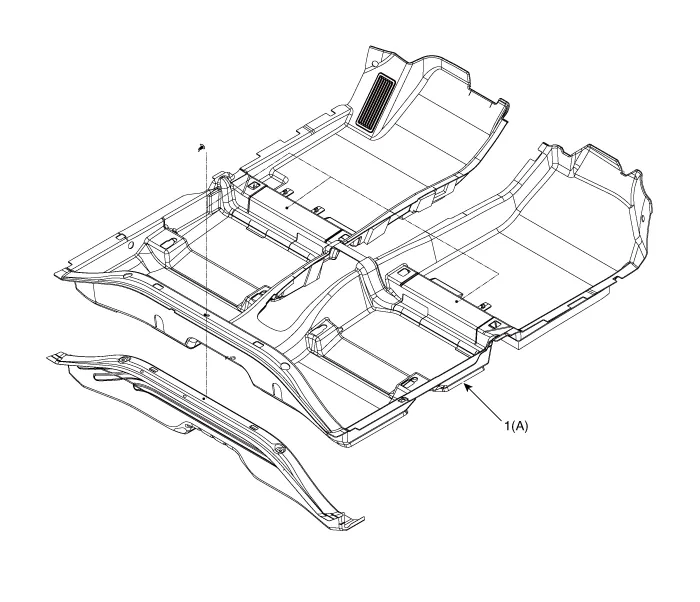
1. Floor carpet assembly


Other information:
Hyundai Accent (HC) (2017 - 2022) Service Manual: CVVT & Camshaft
- Description Continuous Variable Valve Timing (CVVT) system advances or retards the valve timing of the intake and exhaust valve in accordance with the ECM control signal which is calculated by the engine speed and load.By controlling CVVT, the valve over-lap or under-lap occurs, which makes better fuel economy and reduces exhaust gases (NOx, HC) and improves engine performance through reduction of pumping loss, internal EGR effect, improvement of combustion stability, improvement of volumetric efficiency, and increase of expansion work.Hyundai Accent (HC) (2017 - 2022) Service Manual: Specifications
- Specifications DescriptionSpecificationsLimit General TypeIn-line, DOHC   Number of cylinders4   Bore75.60 mm (2.9764 in)   Stroke89.0 mm (3.5039 in.)  Total displacement1,598 cc (97.52 cu.in)  Compression ratio11.2 ± 0.2 : 1  Firing order1-3-4-2   Valve timing Intake valveOpensBTDC 42° - ATDC 38°   ClosesABDC 7° - ABDC 87°   Exhaust valveOpensBBDC 43° - ABDC 2°   ClosesATDC 0° - ATDC 45°   Cylinder head Flatness of gasket surfaceLess than 0.
Contents
Categories
- Manuals Home
- Hyundai Accent Owners Manual
- Hyundai Accent Service Manual
- Questions & Answers
- Video Guides
- Useful Resources
- New on site
- Most important about car
- Privacy Policy

0.0108