
Hyundai Accent (HC): Mirrors / Inside Rearview Mirror
Before you start driving, adjust the inside rearview mirror to center the view through the rear window. A correctly adjusted mirror in your Hyundai Accent helps you maintain safe awareness of traffic behind you without needing to change your seating position.
WARNING
Make sure your line of sight is not obstructed. Do not place objects in the rear seat, cargo area, or behind the rear headrests that could interfere with your vision through the rear window.
WARNING
To prevent serious injury during an accident or deployment of the air bag, do not modify the rearview mirror and do not install a wide mirror.
WARNING
NEVER adjust the mirror while driving. This may cause loss of vehicle control resulting in an accident.
NOTICE
When cleaning the mirror, use a paper towel or similar material dampened with glass cleaner. Do not spray glass cleaner directly on the mirror, as it may allow cleaner to enter the mirror housing.
Day/night rearview mirror
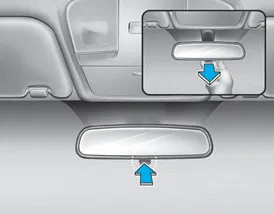
In your Hyundai Accent, set the day/night rearview mirror before you begin driving, while the lever is in the day (normal) position. This quick adjustment helps you get a clear, centered view through the rear window and supports safe everyday driving.
For night driving in the Hyundai Accent, pull the day/night lever toward you to reduce glare from the headlights of vehicles behind you. This anti-glare position helps limit eye strain on darker roads and during long evening trips.
Keep in mind that rearward image clarity is slightly reduced in the night position. If conditions change (for example, brighter street lighting or less traffic behind you), return the lever to the day position for the sharpest rearview visibility.
Electric Chromic Mirror (ECM)
The Electric Chromic Mirror (ECM) rearview mirror automatically manages glare from a following vehicle’s headlamps during nighttime or low-light driving. On Hyundai Accent models equipped with ECM, the mirror dims smoothly to improve comfort while maintaining useful rearward visibility.
With the engine running, a sensor in the rearview mirror monitors ambient light around the Hyundai Accent and continuously adjusts the mirror’s dimming level. As light levels change, the system responds automatically to reduce distracting headlamp glare from vehicles behind you.
Whenever the shift lever is placed in R (Reverse), the mirror will automatically return to its brightest setting to improve the driver’s view behind the vehicle. This brighter setting can make it easier to judge distance when backing up, especially in parking lots or tight spaces.
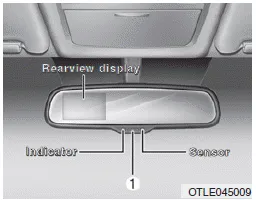
To operate the electric rearview mirror:
- Press the ON/OFF button (1) to turn the automatic dimming function off; the mirror indicator light will turn off. Press the ON/OFF button (1) again to turn the automatic dimming function on; the mirror indicator light will illuminate. For best results in your Hyundai Accent, leave the feature on during night driving and switch it off only when conditions require maximum brightness.
- The mirror defaults to the ON position whenever the ignition switch or the Engine Start/Stop button is in the ON position. If you share your Hyundai Accent with other drivers, it’s still a good idea to confirm the setting before driving, especially after service or battery replacement.
Blue Link® center
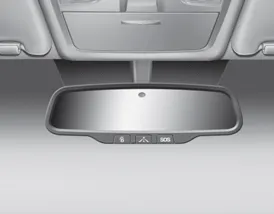
For details on Blue Link® features, account setup, and available connected services for your Hyundai Accent, refer to the Blue Link® Owner's Guide, the Navigation Manual, or the Audio Manual. If your vehicle is not equipped with certain options, these guides can also clarify feature availability by trim level and region.
Electric chromic mirror (ECM) with HomeLink® system, compass and Blue Link®
Your Hyundai Accent may be equipped with a Gentex Automatic-Dimming Mirror featuring a Z-Nav™ electronic compass display and an integrated HomeLink® wireless control system. This enhanced mirror package is designed to improve nighttime comfort and add convenient in-cabin controls for select connected features.
During nighttime or low-light driving, the Hyundai Accent mirror can automatically detect and reduce distracting rearview glare, while the compass display indicates the direction your vehicle is pointing. The integrated HomeLink® universal transceiver can also be programmed to operate compatible garage doors, electric gates, home lighting, and other supported RF devices, helping keep your hands on the wheel and your eyes on the road.
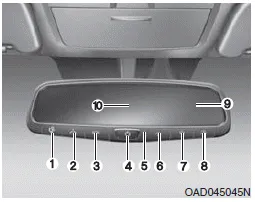
(1) Blue Link Center button
(2) Blue Link POI button
(3) Blue Link SOS button
(4) Compass control button &
Dimming ON/OFF button
(5) Status indicator LED
(6) Channel 1 button
(7) Channel 2 button
(8) Channel 3 button
(9) Compass display
(10) Rear light sensor
Automatic-Dimming Night Vision Safety™ (NVS®) Mirror
The NVS® mirror automatically reduces glare by monitoring ambient light in front of the vehicle and headlamp glare from behind. Any object that blocks either light sensor can reduce the effectiveness of the automatic dimming feature, so keep the mirror face clean and avoid hanging items that may obstruct the sensors.
Your mirror will automatically dim when it detects glare from vehicles traveling behind you. In your Hyundai Accent, the auto-dimming function can be turned ON or OFF by using the Dimming ON/OFF button (4):
1. Press and hold the button for 3 seconds to turn the auto-dimming function OFF. This is confirmed when the green Status Indicator LED turns off.
2. Press and hold the button for 3 seconds again to turn the auto-dimming function ON. This is confirmed when the green Status Indicator LED turns on.
The mirror defaults to the ON position each time the vehicle is started, providing automatic glare reduction whenever conditions require it.
Z-Navâ„¢ Compass Display
The NVSâ„¢ mirror in your Hyundai Accent is also equipped with a Z-Navâ„¢ compass that shows the vehicle heading in the display window using the eight basic headings (N, NE, E, SE, S, SW, W, NW). This can be helpful when navigating unfamiliar areas or when GPS guidance is not available.
Compass function
The compass display can be turned ON or OFF and will remember its last setting when the ignition is cycled. To turn the display feature ON/OFF:
1. Press and release the
 button
within 1 second to turn the display feature OFF.
button
within 1 second to turn the display feature OFF.
2. Press and release the
 button
again within 1 second to turn the
button
again within 1 second to turn the
 display back ON.
Additional options can be set using press-and-hold sequences of the same button; these options are described below. If the display behaves unexpectedly after battery service, allow a short drive cycle for the system to stabilize.

To adjust the Zone setting:
1. Determine the desired Zone Number based upon your current location on the Zone Map. Selecting the correct zone improves compass accuracy for your region.
2. Press and hold the
 button for
6
seconds, the current Zone Number will appear on the display.
button for
6
seconds, the current Zone Number will appear on the display.
3. Pressing and holding the
 button
again will cause the numbers to increment (Note: they will repeat
…13, 14, 15, 1, 2, …). Releasing the button when the desired Zone Number appears on the display will set the new Zone.
button
again will cause the numbers to increment (Note: they will repeat
…13, 14, 15, 1, 2, …). Releasing the button when the desired Zone Number appears on the display will set the new Zone.
4. Within about 5 seconds the compass will start displaying a compass heading again.
Some conditions can change the vehicle’s magnetic environment, such as installing a ski rack, adding a CB antenna, or performing certain body repairs. In these situations, the compass in your Hyundai Accent may require recalibration to restore quick, accurate direction readings.
If you need to recalibrate the compass:
1. Press and hold the
 button for
more than 9 seconds. When the compass memory is cleared a "C" will appear in the display.
button for
more than 9 seconds. When the compass memory is cleared a "C" will appear in the display.
2. Drive the vehicle in 2 complete circles at less than 5 mph (8 km/h) in an open area, away from large metal structures where possible.
Integrated HomeLink® Wireless Control System
The HomeLink® wireless control system provides a convenient way to replace up to three handheld radio-frequency (RF) transmitters used to activate compatible devices such as gate operators, garage door openers, entry door locks, security systems, and home lighting. Once programmed, the Hyundai Accent HomeLink buttons can be used without handling a separate remote.
NOTICE
Considering home security when the vehicle is parked outside the garage, HomeLink will ONLY work when the ignition switch is in the ACC position or ON position.
WARNING
Before programming HomeLink to a garage door opener or gate operator, make sure that people and objects are out of the way of the moving device to prevent potential harm or damage. When programming a garage door opener, it is advised to park outside of the garage.
Do not use HomeLink with any garage door opener that lacks safety stop and reverse features as required by U.S. federal safety standards (this includes any garage door opener model manufactured before April 1, 1982). A garage door that cannot detect an object and stop and reverse does not meet current U.S. federal safety standards. For more information, contact HomeLink at www.homelink.com, or call HomeLink customer support at 1-800-355-3515.
For faster training and more reliable transmission, it is recommended that you install a new battery in the hand-held transmitter (the original remote) before programming it to HomeLink.
1. Programming homelink®
The following steps show how to program HomeLink. If you have questions or difficulty programming the HomeLink buttons, refer to the HomeLink website or call the HomeLink customer support toll-free number. Doing so can often resolve compatibility questions before returning to the dealer.
- Visit the HomeLink website at: www.homelink.com. Then at the top of the page, choose your vehicle make. Then watch the You Tube video, and/or access additional website information.
- If you choose to access the website via your cell phone, scan the QR code.
- Or, call HomeLink customer support at 1-800-355-3515 (Please have the vehicle make/model AND the opener device make/model readily available.)
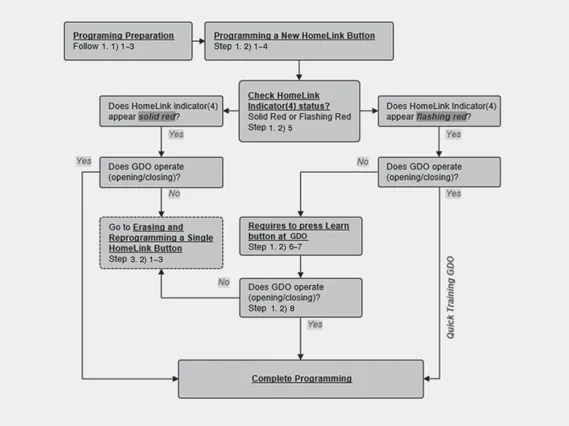
1) Programming Preparation
1. When programming a garage door opener, it is advised to park the vehicle outside of the garage, so the door can move freely while you confirm operation.
2. It is recommended that a new battery be placed in the hand-held transmitter of the device being programmed to HomeLink for quicker training and accurate transmission of the radio-frequency signal.
3. Place the ignition switch to the ACC (Accessory) position for programming of HomeLink.
2) Programming a New HomeLink Button
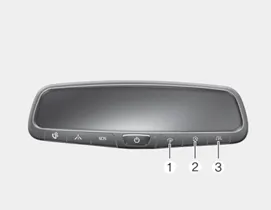
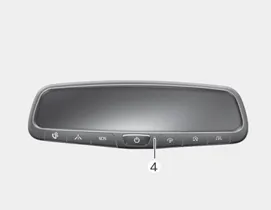
1. Press and hold the HomeLink button (1), (2) or (3) that you would like to program. The HomeLink indicator light (4) will flash slowly in red (if not, perform the steps in the “Erasing HomeLink Buttons� section, then start over).
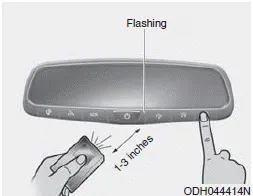
2. Position the garage door opener remote 1 – 3 inches (2 – 8 cm) away from the HomeLink buttons.
3. While the HomeLink indicator light (4) is flashing slowly in red, press and hold the hand-held remote button. Continue pressing the HomeLink button and the hand-held remote button until the HomeLink indicator light (4) changes from slow flashing to rapid flashing. You may now release the buttons.
4. Wait until your garage door comes to a complete stop, regardless of position, before proceeding to the next steps.
5. Press the HomeLink button you are programming and observe the indicator light.
- If the indicator light rapidly flashes or solid red, your device should operate when the HomeLink button is pressed. At this point, if your device operates, programming is complete.
- If the indicator light rapidly flashes, firmly press, hold for two seconds and release the HomeLink button up to three times in a row slowly to complete the programming process. Do not press the HomeLink button rapidly. At this point if your device operates, programming is complete. If the device does not operate, continue with step P6.
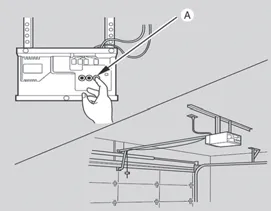
[A] : LEARN BUTTON
6. At the garage door opener motor (security gate motor, etc.), locate the “Learn,� “Smart,� “Set,� or “Program� button. This is usually found where the hanging antenna wire is attached to the motor-head unit (refer to the device’s manual to identify this button). The name and color of the button may vary by manufacturer, but the function is the same: it allows the opener to accept a new transmitter code.
NOTICE
For these HomeLink® setup steps in your Hyundai Accent, using a sturdy ladder and/or having a second person assist you can make the process faster, safer, and more accurate.
7. On the garage door opener motor unit, firmly press and release the “Learn�, “Smart�, “Set�, or “Program� button. Once pressed, you typically have up to 30 seconds to perform the next step, so be ready before returning to the Hyundai Accent.
8. Return to the vehicle and, with steady pressure, press the desired HomeLink button, hold it for two seconds, and release. Repeat this action up to three times in a row, slowly and deliberately. Do not press the HomeLink button rapidly. As soon as you see the garage door begin to move, stop pressing any buttons and wait until a few seconds after the garage door has come to a complete stop, regardless of its final position. At this point, programming is complete, and your device should operate whenever you press and release the HomeLink button.
2. Operating homelink®
1) Operating HomeLink
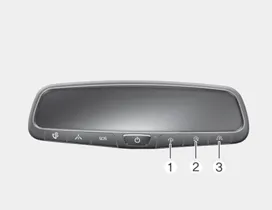
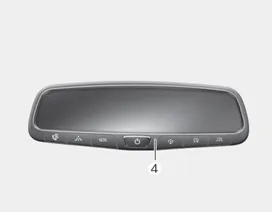
1. Press the desired programmed HomeLink button (1, 2, or 3) in the Hyundai Accent to activate the paired device (for example, a garage door opener or gate).
NOTICE
The HomeLink indicator (4) should be flashing red or solid red, and your programmed device should operate as expected.
If your device does not operate, the HomeLink programming was not successful. For reliable operation, reprogram the button by repeating the programming procedure for your Hyundai Accent.
3. Erasing homelink® buttons
If you recently purchased your Hyundai Accent and are programming HomeLink for the first time, it is recommended that you follow the instructions below to erase ALL HomeLink programming. On new vehicles, there should not be any programming associated with any of the buttons, but clearing them can still help if you experience any programming issues. If you purchased your vehicle used, you should erase ALL HomeLink programming so the unit is fully cleared and ready to accept new programming for your devices.
If you have owned your vehicle for some time and already have one or more HomeLink buttons programmed, you may only want to erase and reprogram a single button. For example, if you move to a new home, you may need to erase and reprogram only button 1 for your personal garage door while keeping the programming of buttons 2 and 3. The same applies if you replace a garage door opener at your current home. Therefore, if you want to erase and reprogram a single button while keeping the programming of one or more of the other buttons, follow the instructions for erasing and reprogramming a single button.
1) Erasing and Reprogramming a Single HomeLink Button:
1. Press and hold the HomeLink button you want to reprogram. DO NOT release the button while completing the next step.
2. The HomeLink indicator light (4) will illuminate solid red. Continue to press and hold the button until the HomeLink indicator light (4) begins to flash slowly in red, which usually takes about 20 seconds.
3. While continuing to press the HomeLink button, proceed with the steps in the “Programming a New HomeLink Button� section to complete setup for your Hyundai Accent.
NOTICE
If you do not complete the re-programming of a new device to the button, it will revert to the previously stored programming.
2) The following instructions will erase ALL HomeLink programming from ALL buttons:
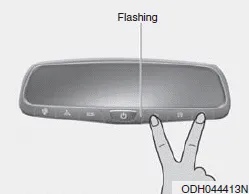
1. Press and hold the buttons (1) and (3) simultaneously until the HomeLink indicator light (4) begins to flash slowly in red (approximately 20 seconds, but do not hold for longer than 30 seconds).
2. Release the buttons. All three HomeLink buttons (1), (2), and (3) are now cleared of any programming and are ready for fresh setup in your Hyundai Accent.
Information
HomeLink® and the HomeLink House® logo are registered trademarks of Gentex Corporation.
The myQ® logo is a registered trademark of The Chamberlain Group, Inc.
FCC (USA)
This device complies with FCC rules part 15. Operation is subject to the following two conditions: (1) This device may not cause harmful interference, and (2) This device must accept any interference that may be received, including interference that may cause undesired operation. WARNING: The transmitter has been tested and complies with FCC rules. Changes or modifications not expressly approved by the party responsible for compliance could void the user’s authority to operate the device.
This equipment complies with FCC radiation exposure limits set forth for an uncontrolled environment. End users must follow the specific operating instructions for satisfying RF exposure compliance. This transmitter must be at least 20 cm from the user and must not be co-located or operating in conjunction with any other antenna or transmitter.


Other information:
Hyundai Accent (HC) (2017 - 2022) Owner's Manual: Tire Replacement
On the Hyundai Accent, a tire that wears evenly will eventually reveal the built-in tread wear indicators. These indicators appear as a solid, continuous band across the tread and confirm there is less than 2/32 inch (1.6 mm) of usable tread remaining. Replace the tire when this happens to help maintain safe braking performance, stable steering control, and reliable wet-weather traction.Hyundai Accent (HC) (2017 - 2022) Owner's Manual: Changing Tires
WARNING A vehicle can slip or roll off of a jack causing serious injury or death to you or those nearby. Take the following safety precautions: Never place any portion of your body under a vehicle that is supported by a jack. Your Hyundai Accent must be supported only at the correct jacking points and must never be relied on as a “stand.� NEVER attempt to change a tire in the lane of traffic.
Categories
- Manuals Home
- Hyundai Accent Owners Manual
- Hyundai Accent Service Manual
- Questions & Answers
- Video Guides
- Useful Resources
- New on site
- Most important about car
- Privacy Policy

0.0054